Introducción

  1. q2Yox2xVugNtLPUv
    q2Yox2xVugNtLPUv
    SGMDQyiO1OvsMjbQ
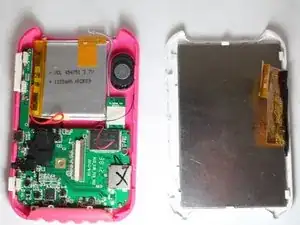
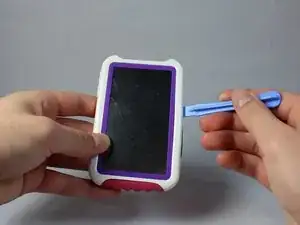
    • Use a spudger to pry open the case of your device to reveal the inside.

  2. yoLE6ZCxMknCNsXV
    yoLE6ZCxMknCNsXV
    Fv2bYxeQV2gLOQEw
    • Disconnect the LCD cable from the motherboard by pressing together the two sides of the clamp to separate the device into two.

  3. OwOPwTJ2OAwPAwLq
    • Use the spudger to pry the LCD from the clamps holding it to the case.

Conclusión

To reassemble your device, follow these instructions in reverse order.

Timothy

Miembro Desde 21/01/15

505 Reputación

0 comentarios