Introducción

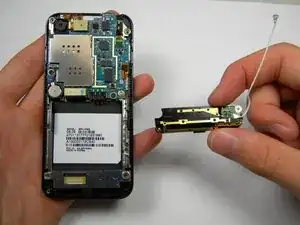
This guide shows how to take out the antenna so that a replacement can be installed.

  1. I12FYsvtkc6kdHDB
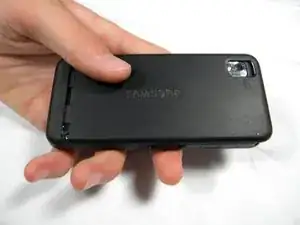
    • Apply pressure to the back cover and slide it forward towards the camera.

    • Lift the back cover off the phone.

  2. UQRSMLCyVNK4TDwk
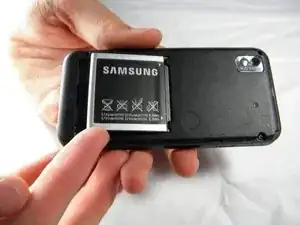
    • Holding the phone firmly, use the notches to grip and lift up the battery.

  3. CxrmvU3kupS1QffX
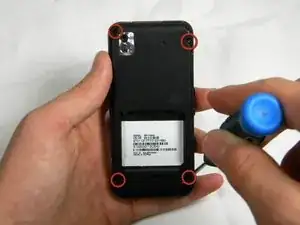
    • Remove the four 4.45mm screws at the corners of the phone.

  4. wRDRnYhaGqRefReI
    wRDRnYhaGqRefReI
    GhUg53ipd2hfPUuQ
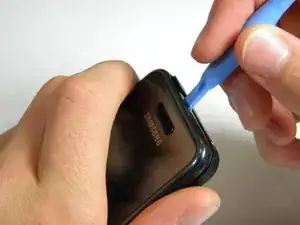
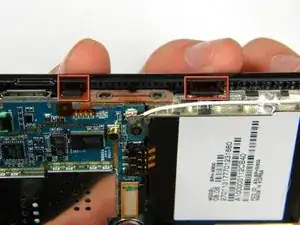
    • Use the plastic opening tool to unhinge the locks around the edges of the phone.

    • Do not worry about the inner components of the phone; they are not connected to this case.

  5. pUKHvCbB5kDUe1RC
    • Lift the casing off of the phone.

  6. rGWbZ5pOsEeLaDNh
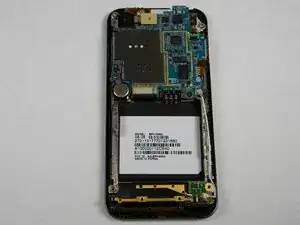
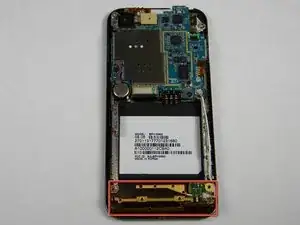
    • With the screws removed, locate the antenna.

  7. DQnQ2UY2nVEWMR3E
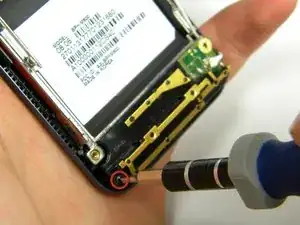
    • Using a Phillips head screwdriver, remove the 4.50mm screw holding the antenna in place.

  8. V2ipXtKadq41OUNm
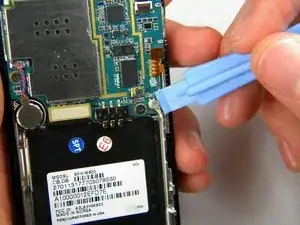
    • Using the plastic opener tool, squeeze gently on the antenna cable connector and lift to remove the connector from its position.

  9. GHLPeicFkGef5XI4
    • Gently lift up on the antenna and remove it from the back of the device.

Conclusión

To reassemble your device, follow these instructions in reverse order.

Jimmy Kuo

Miembro Desde 11/10/11

14 Reputación

0 comentarios