Introducción

Repair guide on how to replace a Speaker on a Samsung SPH-A500 cell phone.

  1. qJXteQnxknZIljob
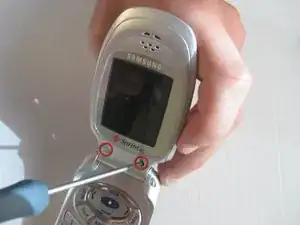
    • Flip open the phone, remove the two rubber covers under the LCD screen.

    • Remove the two screws using a small Philips screwdriver.

  2. Esqug6vWqfZ3pSqx
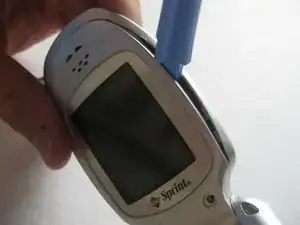
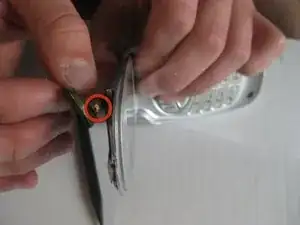
    • Using an Ipod opening tool or your finger nails, pry open the back cover of the LCD screen.

    • Note: Some force may be required.

  3. W3O6krWjDi1Ta51V
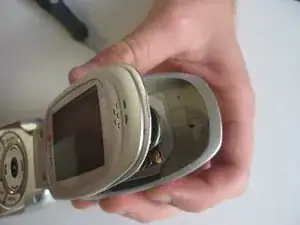
    • Completely separate the back cover from the rest of the phone.

    • Close the phone.

  4. gkikcxhvMMeX3IIN
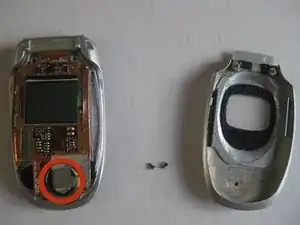
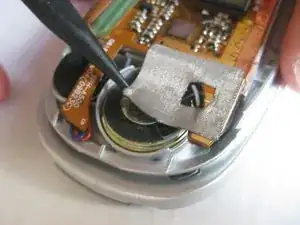
    • The speaker is covered with silver tape on the bottom of the logic board.

  5. 1CAJfuMOmZZ2GKMZ
    • Remove the silver tape that is covering the speaker.

  6. VXxUhhEiXHwpcS3g
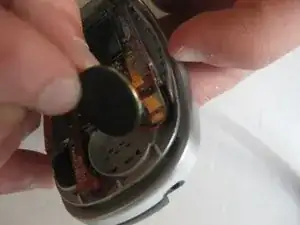
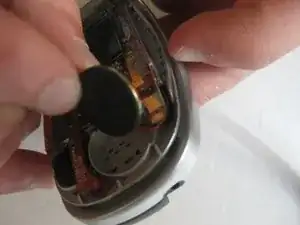
    • Remove the speaker.

    • Note: In order to completely remove the speaker you must disconnect the wires, which will require a soldering iron to reattach the new speaker.

  7. gPQbOZg5JO1DOwaA
    • Attach the new speaker using a soldering iron.

    • Put the speaker back to it's original position and place the silver tape over it.

Conclusión

To reassemble your device, follow these instructions in reverse order.

Nick Dominikovic

Miembro Desde 13/04/10

139 Reputación

0 comentarios